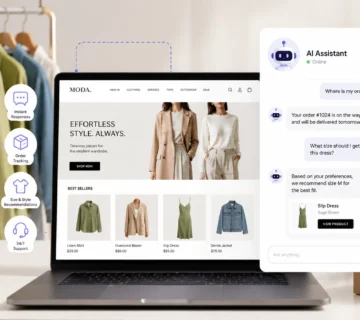

Quick Answer: A WhatsApp chatbot for ecommerce is an automated messaging system that helps online stores answer customer questions, recommend products, recover abandoned carts, send order updates, and manage support conversations directly inside WhatsApp. For growing stores, it turns WhatsApp from a manual inbox into a 24/7 customer support and sales channel.
So there I was at 11 PM, watching my phone light up with customer messages faster than I could type “we’ll get back to you tomorrow.” My online store was growing, which was great, except for the tiny detail that I was drowning in WhatsApp messages asking about shipping times, product availability, return rules, and “do you have this in blue?”
That was the moment I realized something had to change.
I was not going to hire a night-shift support team for a small operation. But I also could not let potential customers wait 12 hours for basic answers. In ecommerce, slow replies do not just create frustration. They lose sales.
That is where a WhatsApp chatbot for ecommerce becomes useful.
WhatsApp has become one of the most natural communication channels for shoppers. People already use it every day, they trust it, and they expect fast replies there. Smart ecommerce stores are using chatbots to turn that green app icon into a practical 24/7 sales and support system.
And the good news is that you do not need to be a technical expert to start. You can begin with simple automation, then grow into more advanced AI-powered workflows as your store becomes more complex.
For businesses building a more complete automation layer, a WhatsApp chatbot for ecommerce can connect naturally with WhatsApp automation, store automation, and broader AI services.
What Is a WhatsApp Chatbot for Ecommerce?
A WhatsApp chatbot for ecommerce is an automated assistant that lives inside WhatsApp and handles customer conversations for an online store.
It can answer common questions, send product links, check order status, explain return rules, collect customer details, and guide shoppers toward checkout. More advanced versions can also use AI to understand customer intent, recommend products, and hand off difficult cases to a human support agent.
Think of it as a digital sales assistant that never sleeps, never takes coffee breaks, and never gets irritated when someone asks the same question for the hundredth time.
The best WhatsApp chatbots combine two things:
- The personal feel of messaging: Customers talk to your store in an app they already use.
- The efficiency of automation: Your store can respond instantly without a human typing every reply.
That combination is powerful because ecommerce customers often need fast answers before they decide to buy.
Why Ecommerce Stores Use WhatsApp Chatbots
Let’s be honest: customer expectations are higher than they used to be.
People expect fast replies at night, on weekends, and during busy periods. They want personalized help, but they do not want to wait in a queue. They may abandon a cart simply because they could not get a quick answer about size, shipping, availability, or return rules.
A WhatsApp chatbot for ecommerce helps solve this problem by giving customers instant support in a familiar channel.
It is especially useful for online stores that receive repeated questions such as:
- “Where is my order?”
- “How long does shipping take?”
- “Is this product available in another color?”
- “What size should I choose?”
- “Can I return this item?”
- “Do you have a discount code?”
If your team answers these questions manually all day, automation can save a lot of time without removing the human side of support.
Core Capabilities That Actually Matter
Modern WhatsApp automation for online stores goes far beyond simple “press 1 for support” menus.
A useful ecommerce chatbot can support several parts of the customer journey.
1. Customer Support Automation
This is the most common starting point.
The bot can answer frequently asked questions about shipping, returns, exchanges, payment methods, store policies, and product details.
Instead of making customers wait for a human, the chatbot gives an immediate answer. If the question is too complex, it can escalate to a support agent with the conversation context already included.
That means the human team does not start from zero.
2. Order Tracking
“Where is my order?” is one of the most common ecommerce support questions.
A WhatsApp chatbot for ecommerce can connect with your order system or shipping provider and send updates directly inside WhatsApp. It can tell the customer whether the order is confirmed, shipped, out for delivery, delayed, or delivered.
This reduces repetitive tickets and improves the post-purchase experience.
3. Product Recommendations
A chatbot can help customers find products by asking a few simple questions.
For example, in a clothing store, the bot might ask:
- What type of product are you looking for?
- What size do you usually wear?
- Do you prefer a casual or formal style?
- What is your budget?
Then it can suggest products that match the customer’s answers.
This feels more helpful than forcing the customer to scroll through dozens of product pages alone.
4. Cart Recovery
Cart abandonment is a major issue for ecommerce stores.
A WhatsApp chatbot for ecommerce can follow up with customers who added products to their cart but did not complete checkout. The message can be helpful rather than pushy:
- “Still thinking about this item?”
- “Need help choosing the right size?”
- “Would you like delivery information before completing your order?”
This works well because WhatsApp messages are more direct and conversational than traditional email reminders.
For more advanced cart recovery systems, this can also connect with broader ecommerce automation workflows.
5. Payment and Checkout Support
Depending on your country, platform, and payment setup, a WhatsApp chatbot may help customers complete orders or receive payment links directly inside the conversation.
Even when the final payment happens on your website, the chatbot can still guide the customer toward the right product, confirm details, and send a direct checkout link.
The main goal is to reduce friction.
6. Human Handoff
A good chatbot should not trap customers.
If the customer is angry, confused, asking something sensitive, or requesting a human, the bot should escalate the conversation.
This is one of the most important parts of the setup. Bad bots try to answer everything. Good bots know when to stop.
How a WhatsApp Chatbot Works Behind the Scenes
The technology is not magic, even if it can feel impressive when it works smoothly.
At its core, a WhatsApp chatbot receives a customer message, understands what the customer wants, and sends back the most useful response.
In a basic setup, this works through predefined flows. For example, if the customer chooses “Track my order,” the bot asks for an order number and sends the tracking information.
In a more advanced setup, the chatbot uses AI and Natural Language Processing to understand different ways customers ask the same thing.
For example, these messages may all mean the same intent:
- “Where is my order?”
- “When will it arrive?”
- “Shipping status?”
- “Has my package been sent?”
The bot identifies the intent, checks the correct data source, and replies with the right information.
The Technical Stack Without the Headache
Depending on whether you use a ready-made platform or a custom build, a WhatsApp chatbot setup may include:
- WhatsApp Business API: The official interface that allows software to connect with WhatsApp.
- Conversation engine: The logic or AI layer that decides how the bot should respond.
- Product catalog integration: Connection to your products, prices, variants, images, and stock status.
- Order and shipping data: Connection to order status and delivery updates.
- CRM or support platform: Syncing customer conversations and support history.
- Payment or checkout links: Helping customers move from conversation to purchase.
For most store owners, this technical complexity stays behind a visual interface. Many platforms let you build flows by dragging blocks, choosing triggers, and writing response templates.
For custom workflows, you may need software development support, especially if your store uses unusual systems or advanced logic.
For official product context, Meta explains the business messaging infrastructure through the WhatsApp Business Platform, which is the foundation many advanced ecommerce chatbot systems use.
WhatsApp Business App vs WhatsApp Business API
Before choosing a chatbot platform, it helps to understand the difference between the WhatsApp Business App and the WhatsApp Business API.
WhatsApp Business App
The WhatsApp Business App is the simpler option. It is useful for small businesses that want basic tools such as:
- Greeting messages.
- Away messages.
- Quick replies.
- Labels for conversations.
- Basic business profile information.
This is a good starting point if your message volume is still low.
But it is not enough for serious automation at scale.
WhatsApp Business API
The WhatsApp Business API is designed for businesses that need more advanced automation, integrations, and multi-agent support.
It can connect with chatbot platforms, ecommerce systems, CRMs, marketing tools, and custom workflows.
If you want a real WhatsApp chatbot for ecommerce that can handle order updates, cart recovery, product recommendations, and support automation, the API route is usually the right foundation.
Step-by-Step Setup Guide
Now let’s walk through a practical setup process.
The exact steps depend on the platform you choose, but the overall structure is usually the same.
Step 1: Define the Main Use Case
Do not start by trying to automate everything.
Start with the biggest pain point.
Ask yourself:
- Are customers asking the same support questions repeatedly?
- Are abandoned carts a major problem?
- Do customers need help choosing products?
- Are order tracking questions taking too much time?
- Do customers message outside business hours?
Pick one or two high-impact use cases first.
For many stores, the best first use case is either order tracking or FAQ support because both are repetitive and easy to structure.
Step 2: Prepare Your Store Data
A WhatsApp chatbot for ecommerce is only as useful as the information it can access.
Before building flows, prepare the data customers will ask about:
- Shipping policy.
- Return and exchange rules.
- Payment methods.
- Product descriptions.
- Size guides.
- Inventory status.
- Delivery timelines.
- FAQ answers.
If your store data is messy, the chatbot will give weak answers.
Clean data creates better automation.
Step 3: Choose the Right Platform
You can build a WhatsApp chatbot in different ways.
For small stores, a no-code or low-code chatbot platform may be enough. These tools usually include templates, visual builders, and ecommerce integrations.
For stores with custom workflows, complex product logic, or specific automation needs, a custom solution may be better.
When comparing platforms, check:
- Does it support WhatsApp Business API?
- Does it integrate with Shopify, WooCommerce, or your store platform?
- Can it connect to your order and inventory data?
- Can it escalate conversations to humans?
- Can it support multiple languages?
- Does it provide analytics?
Do not choose based on the prettiest demo. Choose based on whether it can support your real customer journey.
Step 4: Build the Main Conversation Flows
Once the platform and data are ready, start building the core flows.
A conversation flow is simply the path a customer follows inside WhatsApp.
For ecommerce, your first flows may include:
- Order tracking: The customer enters an order number or phone number, and the bot returns the latest order status.
- Shipping questions: The bot explains delivery times, shipping areas, and possible delays.
- Return and exchange support: The bot checks the policy and guides the customer through the next steps.
- Product recommendations: The bot asks a few questions and suggests suitable products.
- Abandoned cart recovery: The bot follows up with customers who left products in the cart.
- Human support handoff: The bot transfers complex cases to a real person.
Do not make the first version too complicated.
A simple flow that works is better than an advanced flow that confuses customers.
Step 5: Write Responses That Sound Human
A WhatsApp chatbot does not need to sound robotic.
In fact, it should not.
Customers use WhatsApp for personal conversations, so the tone should feel clear, helpful, and natural. Avoid long paragraphs, heavy language, and overly formal scripts.
A good chatbot response is usually:
- Short.
- Clear.
- Specific.
- Friendly without being fake.
- Easy to act on.
For example, instead of:
Your request has been received and will be processed according to our internal operational framework.
Use:
Got it. Please send your order number, and I’ll check the latest status for you.
Simple wins.
Step 6: Set Escalation Rules
This step is critical.
Your chatbot should know when to stop and pass the conversation to a human.
Escalation should happen when:
- The customer asks to speak with a person.
- The message shows anger or frustration.
- The case involves payment problems.
- The bot is not confident in the answer.
- The issue is outside your policy.
- The order value is high or sensitive.
The handoff should include the conversation history, customer details, and any information already collected by the bot.
That way, the human agent can continue smoothly instead of asking the customer to repeat everything.
Step 7: Test Before Launch
Before sending real customers into the flow, test it properly.
Use real examples from your store.
Try questions like:
- “Where is my order?”
- “I want to return this.”
- “Do you have this in medium?”
- “How much is shipping?”
- “Can I talk to someone?”
- “The payment failed.”
Also test messy messages. Customers do not always write clean sentences.
They may send voice-style text, spelling mistakes, short messages, or multiple questions in one line.
A good chatbot should handle normal customer behavior, not just perfect test cases.
Step 8: Launch Gradually
Do not launch every automation at once.
Start with one flow, such as order tracking or FAQs. Watch the conversations, review mistakes, then improve the flow.
After that, add cart recovery, product recommendations, or post-purchase updates.
Gradual launch protects the customer experience and gives your team time to learn.
Real-World Use Cases That Drive Results
Theory is useful, but the real value appears when the chatbot is tied to business outcomes.
Here are some of the strongest use cases for a WhatsApp chatbot for ecommerce.
Abandoned Cart Recovery
A customer adds products to the cart but leaves without checking out.
The WhatsApp chatbot can send a helpful follow-up message at the right time. It might ask whether the customer needs help choosing a size, wants delivery information, or has a question about payment.
The message should feel helpful, not desperate.
A good cart recovery flow might look like this:
- Customer adds product to cart.
- Customer leaves without checkout.
- Bot waits for the right delay.
- Bot sends a short WhatsApp message.
- Customer replies with a question.
- Bot answers or sends the checkout link.
This is where WhatsApp can outperform email because the conversation feels more immediate.
Order Updates That Build Trust
Instead of making customers check a tracking page, the bot can proactively send updates:
- Order confirmed.
- Order shipped.
- Out for delivery.
- Delivered successfully.
- Delivery delayed.
These small updates reduce anxiety and decrease “where is my order?” messages.
They also make the store feel more reliable.
Product Discovery Through Conversation
Instead of pushing customers to browse a large catalog alone, the chatbot can guide them with a few questions.
For example:
- “What are you shopping for today?”
- “What size do you usually wear?”
- “Do you prefer something casual or formal?”
- “What is your budget range?”
Then it can suggest relevant products.
This works especially well for stores with many SKUs, clothing categories, gift items, beauty products, or products that require explanation.
Post-Purchase Support
The chatbot can also support customers after the sale.
It can help with:
- Care instructions.
- Return requests.
- Exchange steps.
- Review requests.
- Reorder reminders.
- Warranty or support questions.
Post-purchase automation matters because the customer experience does not end at checkout.
Common Myths About WhatsApp Chatbots
Let’s pause for a second and clear up a few misconceptions.
“Customers Hate Talking to Bots”
Customers hate bad bots.
They hate bots that trap them in loops, misunderstand obvious questions, or block access to a human.
But customers do not hate fast answers.
If the chatbot solves simple problems quickly, identifies itself clearly, and offers a human handoff when needed, many customers will prefer it for routine questions.
“It Is Too Complicated to Set Up”
This was more true years ago.
Today, many platforms offer visual builders, templates, and ecommerce integrations. A basic chatbot can be set up without coding.
The complicated part is not always the technology. It is usually the planning: deciding what to automate, preparing clean data, and writing useful conversation flows.
“Only Big Brands Can Afford This”
Not anymore.
Small stores can start with basic WhatsApp Business features. Growing stores can use no-code chatbot platforms. Larger stores can build more advanced custom systems.
The right question is not “Can I afford automation?”
The better question is: “Which level of automation fits my current stage?”
How to Choose the Right WhatsApp Chatbot Solution
In plain English, here is how to decide what you need.
Start With Your Current Pain Points
Do not buy a platform because the demo looks impressive.
Start with what is actually broken in your store.
Are you drowning in repeated customer questions? Missing sales outside business hours? Losing carts because customers do not get quick answers? Spending too much time on order tracking messages?
Your chatbot strategy should match your real problem.
Check Your Technical Resources
Be honest about your team.
If nobody can handle technical setup, choose a no-code or managed solution. If your store needs custom logic, data integrations, or advanced workflows, you may need developer support.
That is where custom software development and automation planning can become valuable.
Check Ecommerce Integrations
The chatbot must work with your current ecommerce stack.
Before choosing a solution, check whether it can integrate with:
- Shopify or WooCommerce.
- Your payment provider.
- Your inventory system.
- Your shipping provider.
- Your CRM or helpdesk.
- Your email or SMS marketing platform.
A chatbot that cannot access your store data will be limited.
Look at Analytics and Optimization
You need to know whether the chatbot is helping.
Useful analytics may include:
- Number of conversations.
- Resolution rate.
- Human escalation rate.
- Recovered carts.
- Revenue from chatbot-assisted sessions.
- Common unanswered questions.
These insights help you improve the bot over time.
Mistakes to Avoid
A WhatsApp chatbot for ecommerce can help your store, but only if it is implemented carefully.
Avoid these common mistakes.
Automating Too Much Too Soon
Do not try to automate the entire customer journey on day one.
Start with one or two clear flows. Make them reliable. Then expand.
Using Robotic Scripts
WhatsApp is conversational.
If your bot sounds like a legal document, customers will feel disconnected.
Use short, natural messages.
Ignoring Human Handoff
Never make customers feel trapped.
Always provide a path to human support, especially for complex or emotional cases.
Launching Without Testing
A flow that looks good on a diagram may fail with real customer messages.
Test with messy, realistic questions before launch.
Not Updating Store Data
If product availability, policies, or shipping rules change, your chatbot needs updated data.
Old data creates wrong answers.
What Success Looks Like
A successful WhatsApp chatbot is not measured only by how many conversations it handles.
Better metrics include:
- Faster response times.
- Lower repetitive support workload.
- Higher cart recovery rate.
- More completed orders from WhatsApp conversations.
- Better customer satisfaction.
- Cleaner handoff between bot and human support.
The best result is not that customers say, “Wow, this bot is amazing.”
The best result is that customers get what they need quickly and continue buying.
Final Thoughts
A WhatsApp chatbot for ecommerce is more than a customer service shortcut. It is a way to meet customers where they already are, answer questions faster, recover lost sales, and support shoppers without turning your team into a 24/7 call center.
The smartest approach is to start simple.
Automate one repetitive use case. Prepare your data. Write clear conversation flows. Add human escalation. Test carefully. Then expand into cart recovery, product recommendations, order updates, and more advanced AI workflows.
For ecommerce stores, especially Shopify and WooCommerce stores, WhatsApp can become a serious sales and support channel when it is connected to the right automation system.
If you want to build a WhatsApp chatbot connected to your products, orders, customer support, and ecommerce workflows, JustOnePrompt can help plan and implement the system through WhatsApp automation, store automation, and AI services.
Frequently Asked Questions
What is a WhatsApp chatbot for ecommerce?
A WhatsApp chatbot for ecommerce is automated software that handles customer conversations, support questions, order updates, product recommendations, and cart recovery directly through WhatsApp.
How much does a WhatsApp chatbot for an online store cost?
Costs vary depending on the setup. Small stores can start with basic WhatsApp Business features, while advanced chatbot platforms and custom integrations may use monthly pricing or development costs based on complexity and message volume.
Can a WhatsApp chatbot recover abandoned carts?
Yes. A WhatsApp chatbot can send follow-up messages to customers who added products to their cart but did not complete checkout. It can answer questions, send checkout links, and help customers finish the purchase.
Can WhatsApp chatbots connect with Shopify or WooCommerce?
Yes. Many chatbot platforms can connect with Shopify, WooCommerce, CRMs, shipping tools, and payment systems. Custom integrations may be needed for more complex workflows.
Do I need coding skills to set up a WhatsApp chatbot?
Not always. Many platforms offer no-code visual builders and templates. However, custom workflows, advanced AI behavior, or deep ecommerce integrations may require technical help.
How do customers react to automated WhatsApp conversations?
Customers usually respond well when the chatbot is clear, fast, useful, and gives them an easy way to reach a human. Poorly designed bots that trap users in loops create frustration.
What should I prepare before launching a WhatsApp chatbot?
Prepare your product data, shipping rules, return policy, FAQ answers, order tracking process, escalation rules, and examples of your brand voice. Clean information makes the chatbot more accurate and useful.